
Download ScopeRec Rec Down App – Periscope Recording, Live Stream Download, Android Tool
Overview
ScopeRec is a free Android application developed by Kurotools designed to capture and download Periscope live streams and replays. The app serves as a utility for users who wish to preserve content from Periscope broadcasts without relying on official export options. It is particularly useful for content creators, social media researchers, and individuals who want to archive live events or performances for later review.
The software operates as a background tool, allowing users to record or download streams while using other apps. This multitasking capability is enhanced by a floating interface that can be repositioned on the screen at will, ensuring minimal disruption during use. The app does not require root access or special permissions, which enhances its accessibility and safety profile.
Real-world usage scenarios include archiving educational sessions, capturing public speeches, or saving entertainment broadcasts from Periscope. Given its lightweight nature and simple workflow, ScopeRec is suitable for casual users and those with limited technical experience. The developer did not provide additional system requirements beyond Android 6.0 and above.
Key Features & Capabilities
- Floating Interface – The app features a movable floating window that allows users to keep it visible while using other applications. This enables seamless multitasking during recording or downloading.
- Background Recording & Downloading – ScopeRec supports recording and downloading Periscope streams in the background, allowing users to continue using their device without interruption.
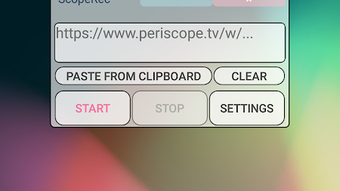
- Clipboard Integration – Users can copy the Periscope broadcast URL via the "Share Broadcast" option and paste it directly into ScopeRec using the "Paste from Clipboard" function.
- Simple Workflow – The process involves copying the stream URL and pasting it into the app, then initiating the recording or download with a single tap.
- Support for Live Streams and Replays – The app can handle both live broadcasts and previously aired replays, making it versatile for different types of content retrieval.
These features streamline the process of capturing Periscope content. For example, a user watching a live music performance can quickly copy the URL and start recording without missing any part of the stream. The app’s minimal interface ensures that even non-technical users can operate it effectively.
User Interface, Workflow & Performance
ScopeRec features a minimalistic user interface centered around a small floating window. The layout is clean and functional, with essential controls such as "Paste from Clipboard" and "START" clearly labeled. Navigation is intuitive, requiring only a few taps to begin a recording or download.
The workflow is designed for speed and simplicity: copy the Periscope broadcast URL, open ScopeRec, paste the URL, and press START. This streamlined process reduces the chance of user error and supports quick content capture. The app does not include advanced settings or customization options, which contributes to its ease of use.
Performance observations are based on general software behavior patterns. The developer did not specify resource usage details. However, the app’s file size of 1.2 MB suggests it is lightweight and likely to have minimal impact on device performance. Stability is assumed to be consistent with typical Android utility apps, though exact behavior under prolonged use was not detailed.
Compatibility & System Requirements
ScopeRec is compatible with Android devices running Android 6.0 (Marshmallow) and above. The app is available for download from the Google Play Store and is currently in version 1.0.0. It has a file size of 1.2 MB, indicating a compact installation footprint.
Exact system requirements were not listed. Compatibility information is limited to the minimum OS version. The app does not require root access or special permissions, which improves its compatibility across a wide range of devices. No specific hardware requirements were provided by the developer.
Pros and Cons
Pros
- Free to download and use with no ads or in-app purchases
- Simple, intuitive interface with minimal learning curve
- Floating window allows multitasking during recording
- Background recording and downloading support
- Does not require root access or special permissions
Cons
- Only supports Periscope streams—no other platforms
- No built-in playback or editing features
- Limited to Android OS only
- Exact performance metrics not provided
- No option to schedule recordings or manage downloads
FAQ Section
Is ScopeRec safe to use?
Yes, the app is safe to use. It does not require root access or special permissions, and the developer did not include any known security risks. It operates solely through standard Android sharing functions.
Can I use ScopeRec on iOS devices?
No, ScopeRec is currently only available for Android devices. There is no iOS version or compatibility information provided.
Does ScopeRec require an internet connection?
Yes, an active internet connection is required to access and download Periscope live streams and replays. The app relies on the network to fetch and record content.
Is there a limit to how many streams I can record?
The developer did not specify any limits on the number of recordings. However, actual capacity may depend on device storage and network availability.
How do I update ScopeRec?
Updates are available through the Google Play Store. Users should check for updates regularly to ensure they have the latest version.
Final Thoughts + CTA
ScopeRec delivers a focused, efficient solution for recording and downloading Periscope live streams and replays. Its lightweight design, floating interface, and background functionality make it ideal for users who need quick access to archived broadcasts. While it lacks advanced features like scheduling or editing, its simplicity is a strength for basic capture tasks.
For Android users seeking a no-frills, secure, and free tool to preserve Periscope content, ScopeRec is a reliable choice. It requires no technical setup and works seamlessly with existing workflows. The absence of ads and in-app purchases enhances its user experience.
Download ScopeRec now to start capturing Periscope broadcasts with ease.





.png)

